Wednesday, August 16, 2017

How to Enable Smart Invert Colors Feature in ios 11 ?

How to Enable Smart Invert Colors Feature 

Step 1: Open the Settings app and go to General -> Accessibility.


Step 2: From here, tap on Display Accommodations.


Step 3: Select Invert Colors.


Step 4: From the next screen, tap on the toggle next to Smart Invert.


Now now see that the background is black and the text is white.Sponsor ads:
Gihosoft Free iPhone Data Recovery:iphonerecovery.com
Free iPhone Data Recovery Software for Windows/Mac
Recover up to 12+ types of files, including contacts, SMS, photos, WhatsApp, Viber, notes, etc.
Restore lost data from iOS devices directly or from iTunes and iCloud backup
Recover iPhone data lost due to iOS upgrade/jailbreak, accidental deletion, device lost or broken
Support all the latest iPhone, iPad and iPod Touch
Both Free and Pro version.
If you lost data after you updated to a new iPhone, you can always use Gihosoft iPhone Data Recovery to get the data back from the old iPhone or backup.
Worth reading:download youtube 1080p

Friday, August 11, 2017

How to Change Payment Information to Paypal on App Store 2019

How to Change Payment Information to Paypal on App Store 2019


How to Change Payment Information to Paypal on App Store 2019

Apple is adding a new payment method option “PayPal” to Apple ID account for App Store, iTunes Store, iBookstore and Apple Music that is Apple users can now add PayPal payment option to their Apple ID account by changing payment information in order to buy apps, musics, movies, TV shows and more from the App Store.

PayPal payment option is now available United States, Mexico, Canada, Germany, Netherland and UK. Apple will be rolling Paypal Payment option to various regions soon.


Paypal will be more secure and make most users to make purchases through this payment method.


How to Add Paypal payment to your Apple ID Account on iPhone/iPad


To add PayPal to your Apple ID account on iPhone in iOS 11/10, select on ‘Payment Information’ and then select PayPal in the Payment Method options and follow all the other the steps to continue.
Jihosoft Giveaway Alert:
iPhone Backup Extractor - Extract Data from iPhone Backup

The best iPhone Backup Extractor software to extract photos, text messages, contacts, voice memos, note, WhatsApp, Viber and etc from iPhone/iPad backup.

Once the payment information change to Paypal, you can purchase all your favorite apps, music, movies, books and more from App Store.

How to Change Payment Information to Paypal on App Store

You can easily change the payment information to Paypal on iPhone/iPad in iOS 11, 10. Here’s how;
Go to App Store

Tap on Account icon from top right corner of the App Store


Then tap on Apple ID Account

It will now redirect to Account Settings

Now Select Payment Information

In the payment method, Select Paypal and then Sign into it with your ID and Password.

After you Sign in Tap on

Done.

Similarly, you can add and change payment information to Paypal using iTunes on Mac or Windows.Go to App Store in Mac and iTunes Store on Windows >> Tap on Account


Under Account Information >> Click on Edit Payment Type


Select Paypal option >> Sign into Paypal Account and Done.


That’s it. You have successfully changed your Payment Information to Paypal option.

15+ new Features added to iOS 11 beta 4

Apple has released iOS 11 beta 4 to developers with some changes and has added quite a few features to it. Below are the features and changes that Apple has brought to iOS 11 beta 4:Must Read:how to delete synced photos from iPhone


  • New welcome screen on Notes app
  • Modified Notes app icon
  • New welcome screen on Photos app
  • Modified Reminders app icon
  • Modified Contact icon
  • Small change in Safari logo
  • Bolder WiFi icon on Status Bar Must Read:iPhone video size
Below are the features and changes that Apple has brought to iOS 11 beta 4: New welcome screen on Notes app Modified Notes app icon
  • Modified Spotlight Web, App Store and Maps search icon
  • Modified Timer iconMust Read:how to make ipod faster
  • Animation on Screen recording icon in Control Center
  • Start Broadcasting again renamed with Start Recording in Screen Recording feature
  • New animation in Low Power Mode icon
  • New Mute icon animation on iPad Must Read:iPhone 5s blue screen
  • Pull to Refresh added on App Store Updates
  • Lock Screen Notification gains swipe interactions from left to right and vice versa
  • Open apps from Lock Screen Notification using Touch ID or Passcode
  • Airdrop gains its own dedicated panel in under General Settings
  • App Switcher won’t open when there is no app running in the background

There is still few months left for Apple to release final version of iOS 11. Apple might add more features to its new iOS in coming days. So don’t forget to check out www.imangoss.net for more updates like this.You may also like:
If you lost videos from iOS Camerall Roll which are nowhere to download again, you can use Jihosoft iPhone Data Recovery to get back deleted videos from iOS device including iPhone, iPad and iPod Touch.Please check jihosoft iphone data recovery

Tuesday, August 8, 2017

About Jailbreak Tweaks: Auto SilentMe, NFCWriter, QuietWhilePlaying

There are hundreds of tweaks released for the jailbreak community weekly. But in this roundup, we will talk about some typical jailbreak tweaks launched throughout the past week that we think they are useful for your jailbroken iPhone/iPad. Here are three our favorite tweaks you should considering installing on your device.
Auto SilentMe
Auto SilentMe is a very useful tweak for those who are always busy as the tweak will be able to automatically make your incoming notifications silence, which is based on calendar events that you have previously set.
So if you want your device to be quiet during your business meetings, or family gatherings, all you need to do is setting up calendar events for them and then the tweak will take care of everything for you without annoying you.
NFCWriter – $3.99 Must read:Gihosoft Free iPhone Data Recovery:https://www.gihosoft.com/iphone-data-recovery-free.html
NFCWriter tweak has only been released after the iOS developer, Limneos was successfully hacked the Apple’s NFC chip to work with third-party devices though normally it has been locked.
This new tweak allows your iPhone to interact with other devices, such as tags or collecting data about them. Since this feature is available on many Android devices out of the box, so the tweak will help your iPhone not stay back with other non-Apple devices
From iOS 11, this functionality will be included in the version, but if you are still having a jailbroken iOS 10 device and want this functionality without having to update, then you can launch Cydia, search for NFCWriter and grab it.
QuietWhilePlaying (iOS 10) – FREE
It’s very annoying when you are bombarded by an onslaught of notifications while listening your favorite music. These notifications interrupt your music playback by decreasing the playback volume, and they can even ruin the best parts of your song.
But with the QuietWhilePlaying (iOS 10), you can easily keep notifications silent while playing your music. Although there are still the banners at the top for you to interact with them, as you don’t hear the notification sounds, your music still keeps playing throughout the notifications.
Here are three typical tweaks we want to introduce to you. Hope they will be useful for you. We’ll continue updating other interesting tweaks for jailbroken iPhone/iPad. Follow jailbreakiphone.info to get more detail.

How to Uninstall Apps Completely On Your Mac Using AppCleaner ?

Your Mac is crowed with many apps and you feel your Mac is running slower than normal, it’s good time to make a clean all unnecessary and idle apps on your device to make more spaces for storing other files and apps and help your Mac run faster. However, if you have many third-party apps installed on your Mac, uninstalling them is not as simple as you think. You will have to do this manually. So to help you do it easier, in this post, we will instruct you how to uninstall the apps completely with the help of AppCleaner.Must Read:How to send long videos from iPhone ?

Steps to Use AppCleaner to Uninstall Apps on Mac

However, before getting started, you should know that AppCleaner is a light app for Mac OS to be used for removing or uninstalling any app on Mac, including unofficial apps from App Store. The latest build of AppCleaner works with Mac OS X 10.4 – 10-11. Here is step-by-step guide to use AppCleaner to uninstall apps on your Mac.
First of all, you have to download AppCleaner applicationand then install it on your Mac.
When unzipping the app, there will appear the following prompts to check whether you want the app to automatically update.
We recommend you to allow the app to check for any new updates by selecting ‘Check automatically’.
Next, launch Spotlight Search feature of the app and search for the app you want to uninstall it.
When the results displays on your Mac, now drag and drop the app you want into the AppCleaner’s window. Must Read:How to get more gb on iPhone?
Click on the tab saying ‘Remove’ to uninstall the app. You will be prompted to enter your password for proceeding.
Wait for the process completed.If you lost videos from iOS Camerall Roll which are nowhere to download again, you can use Gihosoft iPhone Data Recovery to get back deleted videos from iOS device including iPhone, iPad and iPod Touch.
Jihosoft iPhone Backup Extractor Extract and recover all types of data from iPhone backup files, such as camera roll photos, videos, SMS, contacts, reminders, WhatsApp, and etc.
Gihosoft Android data recovery Free is a super awesome software specialized in Android file recovery. With this program, you are able to recover deleted photos, music, videos, messages, contacts, call logs, WhatsApp messages, Viber chat history and more from Samsung, Huawei, LG, HTC, Motorola, Google, Oneplus, Sony, Lenovo, ZTE and other Android devices directly. Meanwhile, this Android data recovery software is available for both Windows and Mac platforms.

Also read: How To Speed Up A Slow Mac Or MacBook Using CleanMyMac

Which makes the AppCleaner app different from other apps on Mac that it is free of charge and you will not have to pay any fee. The app allows removing and uninstalling all the unwanted software to free up storage space and help your Mac run faster.

How to Fix iCloud Notes Not Syncing On Your iPhone/iPad ?

Notes that were made on Mac will then appear on iPhone and iPad through the cloud. However, some users have recently noticed their iCloud notes did not sync from their iPhone/ iPad onto Mac. So if you are in the same situation, in this post we’ll show you five popular methods to fix the problem.
But before applying to the methods to fix iCloud notes not syncing, you need to enable notes for your iCloud account. To this, head to Settings -> MailContacts & Calendars or Settings -> iCloud.
  1. Change Default Notes Account to iCloud Sponsor Ads:
    Gihosoft iPhone Data Recovery is a professional iPhone Data Recovery software to get back all your lost text message, photo, video, call history, note, contact and more from iPhone/iPad/iPod Touch. It offers a full solution to recover your lost data in different tough situations. Besides recovering data directly from iPhone, iPad and iPod touch, it also allows you to recover data from iCloud and iTunes backup files. What's more, it supports Smart Recovery modes that can find your iPhone data quickly.
To change the default notes account, go to Settings -> Notes -> Default Account and change it to iCloud.
  1. Unselect Notes in iCloud Settings Must read:icloud activation lock removal
To fix iCloud notes not syncing problem, you can unselect notes in iCloud preferences. Doing this will delete all local copies of iCloud Notes. To refresh, go back to iCloud preferences and choose notes again.
  1. Delete and Re-add the iCloud Account
Another way you could try to solve iCloud notes not Syncing issue is deleting iCloud account currently being used on your iPhone, iPad, and your Mac and then create it again.
  1. Uncheck iCloud Notes Sync Must read:icloud activation lock removal
On your Mac, go to System Preferences -> iCloud and unselect Notes Sync and sign out. After that, log in again, and choose Notes sync and open Notes.
  1. Restart your Devices and Try Again
If none of these above methods solves iCloud notes not syncing issue, you need to restart your device. To do this, go to Settings -> iCloud and disable Notes before turning off your iPhone.
Once your device boots up, choose notes in the Notes app. If you don’t do procedure correctly, all your notes will stored in the cloud.
Again, head to Settings -> iCloud and choose Notes. After waiting for a few seconds,  Notes will be synced and updated between your Mac and other iOS devices.

Plagramme Plagiarism Checker Review

Plagramme Plagiarism Checker offers innovative features to Check Content


The cliché goes: ‘Imitation is the best form of flattery’. In real life situations, the one who gets flattered may be happy about it, but may not harm the interest of the individual doing the copying. However, to lift someone else’s work online and publish as one’s own can prove to be detrimental to the person committing Plagiarism. And there are effective tools to instantly check if the content has been copied from elsewhere. The latest to join this fight against plagiarism is the Plagramme Plagiarism Checker.


There are indeed some refreshing features in the new software and should prove to be very useful for genuine content writers in any field of activity.

Plagramme Plagiarism Checker


Some of the salient features of Plagramme Plagiarism Checker are enumerated below.


1) Multilingual


This must be considered as a unique feature and probably the first ever attempt by the developers of plagiarism checking tools to come up with it. This is in response to the widespread practice of people exploiting the weakness in the existing tools to check content if it has been translated into a language different from the original one. The Plagramme plagiarism checker comes with the capability to identify and flag such translated content.


2) An Advanced Scoring Method


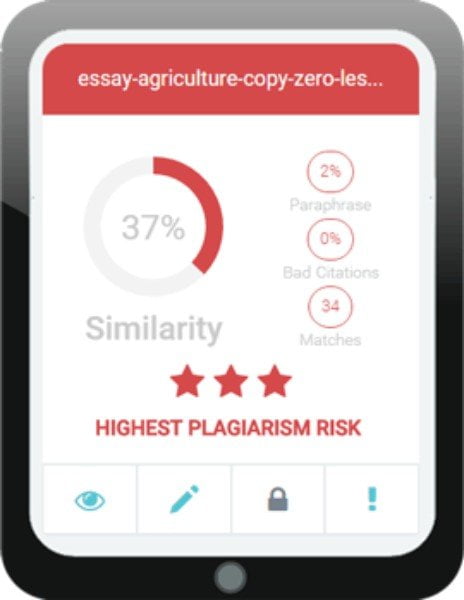
The Plagramme plagiarism checker has brought in several enhancements in the manner in which the content is checked and presented. Most such tools would just mark the percentage of genuine content and nothing much else. But when you use Plagramme, it lets you know the number of similarities found in your content as any such tool would do. Also, it can suggest the risk of plagiarism; it can point out if the content you created has too much paraphrasing and also bring out the anomalies in terms of bad citations. Of late, this has been an issue among the academic circles, and excessive use of citations has led to difficult situations for those evaluating the dissertations. Plagramme is capable of highlighting the wrong or indiscriminate use of citations.


3) Detecting Unusual Methods to Escape Detection


There is a dictum among the police officers that in order to solve a crime, you might have to think like a criminal and then trace the solution. The job of a plagiarism checker has also reached such proportions. One of the strange ways adopted by those who deliberately engage in copying content is to camouflage it by introducing extra alphabets or letters and coloring them white. This would not show up while reading with bare eyes in the white background. But the plagiarism checker will pick them up and pass them off as being different than the original and therefore genuine. Luckily, Plagramme has worked around this trick also by employing appropriate algorithms, and it can detent such ‘white color’ characters as well. This must prove quite handy in the hands of users of the tool to check the originality of content in submissions made by their clients or students or in any other setting.


4) Ease of Use, and it’s Free


The developers of the Plagramme plagiarism checking tool have made it very convenient for the users to experience and use this online application on their systems. The interface is quite uncomplicated, and navigation made simple so that even those who may use it rarely and are not so tech-savvy can also employ the tool. Once the content gets checked and confirmed through Plagramme, the content creator can be sure that it will pass any test.


5) Other Features


There are many other facilities like online editing and the use of cloud storage to park your document for checking for plagiarism. Besides, Plagramme does the checking for the originality of content against a much larger basket of online content than any previous tool would do. About 14 trillion websites and other resources on the web would be scanned to compare the contents and certify as being original.


Bottom Line


From the perspective of the professionals who use the tool to check on content they are about to upload to the sites of their clients, it gives that additional comfort that Plagramme Plagiarism Checker acts the way Google’s algorithms would function. They won’t be presented with surprises later where their contents are removed as being copied from elsewhere. Many independent analysts and experts have tested the Plagramme plagiarism checker and feel it is one of the best things to happen to the content writing business in recent times.If you lost videos from iOS Camerall Roll which are nowhere to download again, you can use Gihosoft iPhone Data Recovery to get back deleted videos from iOS device including iPhone, iPad and iPod Touch.

Jihosoft iPhone Backup Extractor Extract and recover all types of data from iPhone backup files, such as camera roll photos, videos, SMS, contacts, reminders, WhatsApp, and etc.
Gihosoft Android data recovery Free is a super awesome software specialized in Android file recovery. With this program, you are able to recover deleted photos, music, videos, messages, contacts, call logs, WhatsApp messages, Viber chat history and more from Samsung, Huawei, LG, HTC, Motorola, Google, Oneplus, Sony, Lenovo, ZTE and other Android devices directly. Meanwhile, this Android data recovery software is available for both Windows and Mac platforms.

You can use this online tool from Plagramme.com.

Why iPhone cost more than the iPad ?

Why iPhone cost more than the iPad ?
There a few reasons.  To begin with, the iPhone is always a few steps ahead in technology when compared to the iPad.  TouchID and processors are an example. 

Part Cost Differential 

The screen on the iPhone 6 Plus is about $45.00 wholesale.  The screen on an iPad is about $65.00.  The radios on an iPhone 6 is about $43.00.  The radios on an iPad (wifi version) is about $8.00.  The A8 processor on the iPhone 6 is about $35.00.  Then A7 on an iPad is about $17.00. 


Size Matters- Inversely 

The inverse relationship of size vs. cost is another factor.  The smaller you make something the more complex it becomes and thus the more costly to accurately manufacture.   Even in the case of the battery on the iPhone 6 vs. the iPad, although larger and has a longer life, the iPhone 6 battery costs more because it has to be made smaller.

Subsidized 

The iPhone is built with the idea in mind that a vast majority will be sold with some form of subsidization from the cellular company.   Thus Apple can actually make a bit more of a markup based on the fact that the true final cost of the unsubsidized device will not have as much of a “sticker shock”.   The subsidization actually allows iPhones to have the newest technology because the true costs can be “hidden”. 

Us consumers only care about the price tag that is attached to the phone and view all plan subsidies as being equal, we see $299 for an iPhone 6 and feel it reasonable.  However in the case of the iPad there are few situations of unsubsidized and thus there is a “sticker shock” if the prices move too high.If you lost videos from iOS Camerall Roll which are nowhere to download again, you can use Gihosoft iPhone Data Recovery to get back deleted videos from iOS device including iPhone, iPad and iPod Touch.
Jihosoft iPhone Backup Extractor Extract and recover all types of data from iPhone backup files, such as camera roll photos, videos, SMS, contacts, reminders, WhatsApp, and etc.
Gihosoft Android data recovery Free is a super awesome software specialized in Android file recovery. With this program, you are able to recover deleted photos, music, videos, messages, contacts, call logs, WhatsApp messages, Viber chat history and more from Samsung, Huawei, LG, HTC, Motorola, Google, Oneplus, Sony, Lenovo, ZTE and other Android devices directly. Meanwhile, this Android data recovery software is available for both Windows and Mac platforms.

iPhone 11 Hands-On Roundup

Alongside the iPhone 11 Pro series , Apple also announced the iPhone 11. While the phone might not carry the same premium design or the t...